Open source
The code for this site is free. Take it. Change the name. It's yours.
- License
- MIT. Free to use.
- Built with
- Astro and Cloudflare
- Cost to run
- Free. A domain is extra.
- Time to live
- About 30 minutes
This site is a test. I wanted to see if I could build a real website with AI doing most of the work. Not me typing code all day. An AI agent called Claude Code does the building. I tell it what I want.
So far it works better than I thought it would. But there's a catch, and the catch is the whole point.
Why I made it free
Most SEO advice is just people talking. This is the real thing. The rules, the tests, and a live site you can go look at. You can check if it works instead of taking my word for it.
You can also just take it. Want a fast personal site that's set up right? This one already is. Swap my name for yours and you're done.
How it works, in plain words
Every page gets built ahead of time. It turns into a plain file that sits there and waits. When you visit, the file is already done. No server has to think about it.
That's why it loads fast. That's why it costs nothing to host. And that's why almost nothing can break.
Here's the catch I mentioned. The site has rules, and the rules are not suggestions. A page can't go live without a title and a short description. Not "shouldn't." Can't. The site refuses to build. There are a few hundred checks like that. Broken links. Images with no description for screen readers. Pages that nothing links to.
That matters a lot when AI writes the code. An AI will happily ship a page with no description, and nobody would notice for months. Here it fails right away and tells you why. The rules are what make the AI safe to trust.
Free chat box and visitor stats
One more thing, and I should say up front that I co-founded the company behind it. So take it how you want.
CloseBot gives out a free Sales Pixel. Drop that one code into the site and you get two things.
The first is a chat box. It answers questions for people while you sleep, and it can take their email for your newsletter.
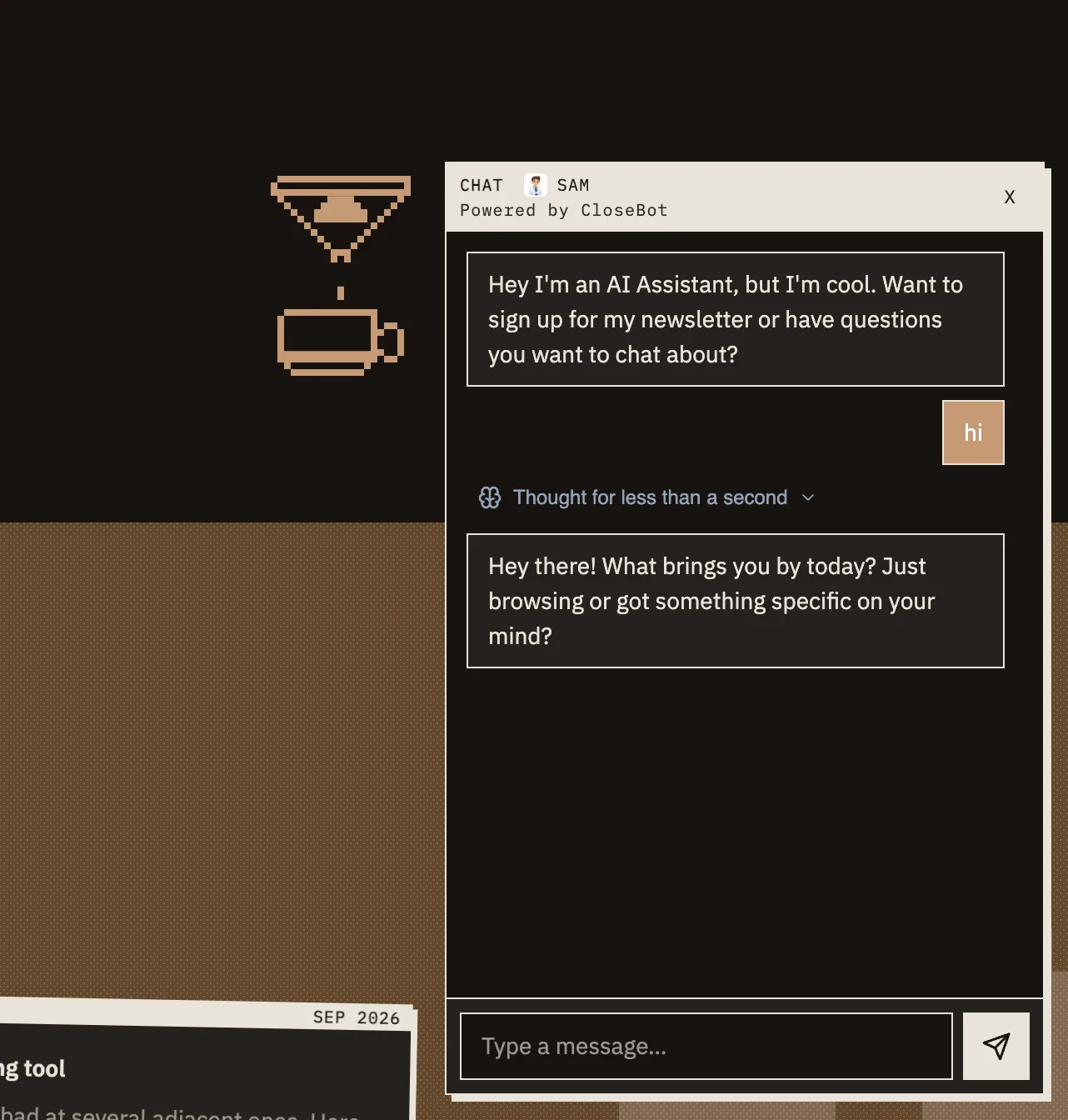
You can change how it looks without logging in to CloseBot. The widget's styling lives in a file in this project, so an AI tool can edit it. I had Claude Code restyle mine to match the site. Square corners, my colors, no blue bubble.
The second is numbers. You can see which pages people actually land on, and which ones get them to start a chat.
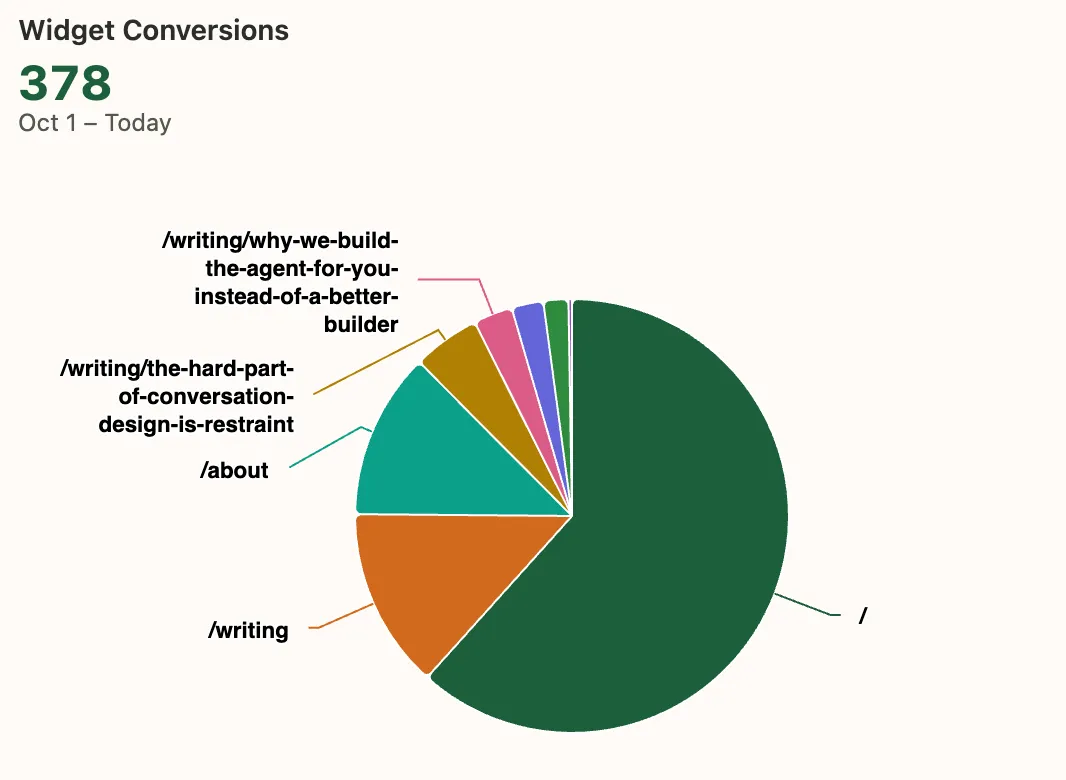
You don't have to use it. Leave it blank and there's just no chat box. Everything else works the same. But it's free, it's one line, and it covers two jobs most people pay for separately.
What's yours and what's mine
The code is MIT licensed. That's a fancy way of saying use it, change it, even sell what you make. Just keep the license file in there.
My posts, my photo, and the share images with my name on them are not included. You'd swap those out anyway. The project lists exactly what to change. You get the engine, not my face.
How long this takes
About 30 minutes, and then it's live on the internet. Not a weekend.
| Step | Time |
|---|---|
| On your computer | 5 minutes |
| Your name on it | 10 minutes |
| Live on the internet | 10 minutes |
| Chat box and stats | 5 minutes |
Make two free accounts first, or the clock starts late. One at GitHub. One at Cloudflare. Both free, both quick.
You don't need a domain yet. Cloudflare hands you a free web address that ends in workers.dev. Your site goes there first. Point your own name at it later, once you have one.
Here's the honest part. Setup is half an hour. The writing is not. The posts are the slow bit, and they stay the slow bit. No tool fixes that.
What to tell Claude Code
Six things to say. Copy one, paste it, read what comes back. Fill in the blanks with your own stuff.
1. Get it on your computer
You need Node 22 on your machine. Ask for it in the same breath if you don't have it.
Clone https://github.com/closebotai/brycedecora
into a new folder. Read README.md and AGENTS.md
before you change anything. Then install it, start
it up, and tell me what address to open.
Look at what it reads first. The rulebook. That's the part that matters. It learns the rules before it writes a line, so it doesn't have to guess. Open the address it hands back and the site is there.
2. Put your name on it
The project keeps a list of every spot my name is hiding in. It's a table in the setup guide. Point Claude Code at it and let it work down the rows.
Open the "Forking this" table in README.md and do
every row for me. My name is ____. My email is
____. My links are ____. Delete the articles, the
photo, and the share cards. Those are not mine.
Then run pnpm bean && pnpm og && pnpm test, and fix
whatever fails.
My posts, my photo, and my share cards are not yours to keep, and this is the step that pulls them out. Don't skip it. Ship it with my name still in it and you've published a copy of me.
3. Put it on GitHub
Cloudflare builds straight from GitHub, so it has to live there first.
Make this a new repo on my GitHub and push it.
Call it ____.
It'll stop and ask you to log in to GitHub once. You do that bit. It can't type your password, and it shouldn't.
4. Put it on Cloudflare
This is the one people expect to be hard. Claude Code can drive your browser. You log in to Cloudflare, then hand it the wheel and it clicks through the setup for you.
Use my browser. Go to Cloudflare. Make a new Worker
from my GitHub repo. Use these settings:

  Build command      pnpm test
  Deploy command     npx wrangler deploy
  Root directory     /
  Production branch  main
  Build variable     PNPM_VERSION = 11.9.0

Give the Worker the same name as "name" in
wrangler.jsonc. Start the build and tell me when it
is done.
Two things bite people here, so say them out loud. The Worker's name has to match the name in the project, or the build just fails. And that PNPM_VERSION line is not optional. Leave it out and the build dies with an error that never tells you why.
Look at the build command, though. It's the test command. So the site can't go live broken. That's the catch from earlier, doing its job.
When the build finishes you get a free address. Hand it back:
Put the workers.dev address Cloudflare just gave me
into SITE_URL in src/data/site.ts. Then push.
5. Get the free chat box and stats
Same trick. Your browser, your login, its hands.
Use my browser again. Log me in to CloseBot. Go to
Source Settings, then Setup, then Sales Pixel. Copy
that id. Put it in my .env file as CLOSEBOT_SOURCE.
Then put it in Cloudflare too, as a build variable,
under BOTH tabs: Production and Previews Base.
Both tabs. I mean it. They're two separate lists, and filling in one leaves your test pages with no chat box and nothing to tell you why. Nothing breaks. It's just quietly not there.
So check the real page, not the dashboard.
Now check my live page really has the chat script
on it. Do not trust the dashboard.
6. Turn on the safety settings
Four switches live in Cloudflare and nowhere else. They can't sit in the code, because there's no server here to run them.
Still in my browser, in Cloudflare under SSL/TLS:
turn on Always Use HTTPS, set Minimum TLS Version
to 1.2, and turn on HSTS and the No-Sniff header.
Then check from the command line that the header is
really being sent.
The HSTS one has a trap in it. The box opens scrolled past its own on switch, so you can save it, watch it save, and have it do nothing at all. That's why the last line says check from the command line.
What it can't do for you
Three things, so none of them surprise you halfway through.
It can't buy your domain. That needs your card. Buy one whenever you want it, then say this:
Add my domain to Cloudflare and point it at this
Worker. Then put it in SITE_URL and push.
Call that ten more minutes, plus some waiting around for the rest of the internet to catch up.
It can't type your passwords. You log in, every time, and then it takes over. Driving your browser needs the Claude extension for Chrome, and you hand it permission one site at a time.
And it can't know what you want to say. It'll ask. That's the half of this no tool is going to do for you.
Build something with it? I'd love to see it. info@closebot.ai